
Regent5 is a certified Lutron dealer holding Lutron HomeWorks certification, and a C10 and C7 licensed contractor, CSLB License 1033103. We service and upgrade Lutron HomeWorks Interactive, HomeWorks Illumination, HomeWorks QS, and RadioRA 2 systems for estates in Atherton, Woodside, Portola Valley, Hillsborough, Los Altos Hills, Los Altos, Menlo Park, Palo Alto, and San Francisco. A large number of Peninsula estates are running Lutron systems installed fifteen or twenty years ago. Those systems still work. What frequently no longer exists is the company that installed them. Owners are told the system is too old to service, or simply cannot get a call returned. That is usually a statement about the contractor rather than about the equipment.
The design software for HomeWorks Illumination is distributed by Lutron only to dealers holding HomeWorks certification, from the legacy products area behind a myLutron login. A firm without that certification cannot obtain the tool, which means it cannot open your project file, cannot read your existing programming, and cannot make a change without starting from nothing. Regent5 holds that certification. It is the practical reason we can take on systems other companies turn down, and it is worth asking any integrator about before they quote you a full replacement.
HomeWorks Interactive is the oldest generation still in regular service. HomeWorks Illumination followed it, and was designed as a one to one upgrade from Interactive, sharing most devices without replacement. Illumination is recognizable by RPM panels driven by a Module Interface, by addressing set with dial wheels and DIP switches rather than serial numbers, and by Series 4, Series 8, or RF processors. HomeWorks QS is the generation after that, and QSX is current. On the wireless side, RadioRA 2 is now classified by Lutron as a legacy system, with RadioRA 3 as its successor. We identify what is actually in the house before proposing anything, because the panel, the processor, and the devices on the wall determine the work far more than the age of the system does.
Open the closet or the equipment room and photograph the panel. The model number printed on each module tells us the generation, the zone count, and what the upgrade path looks like. Send us that photograph and we can tell you a great deal before anyone visits.
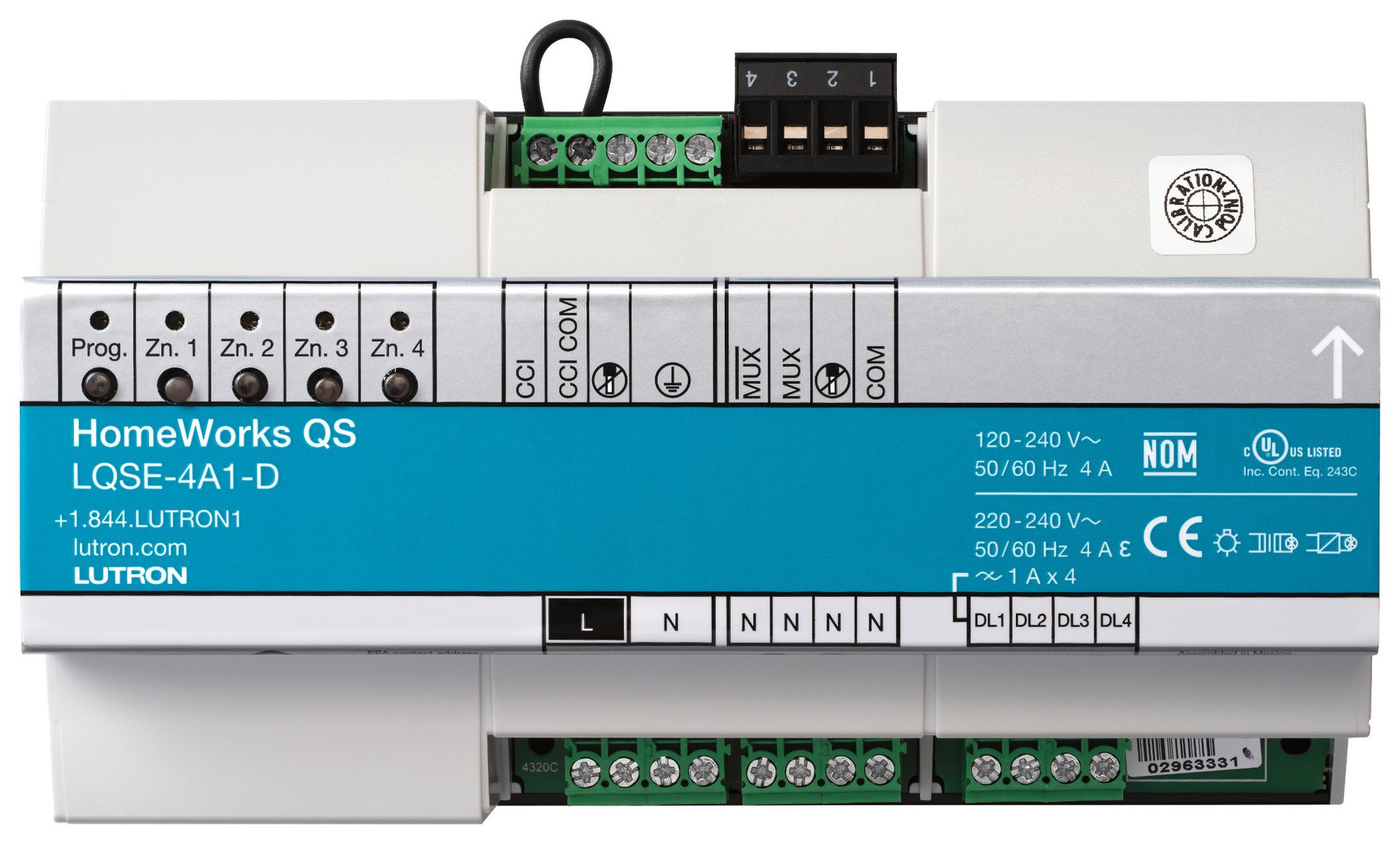
LQSE-4A1-D
HomeWorks QS four zone DIN rail dimming module. Teal label, zone buttons across the top.
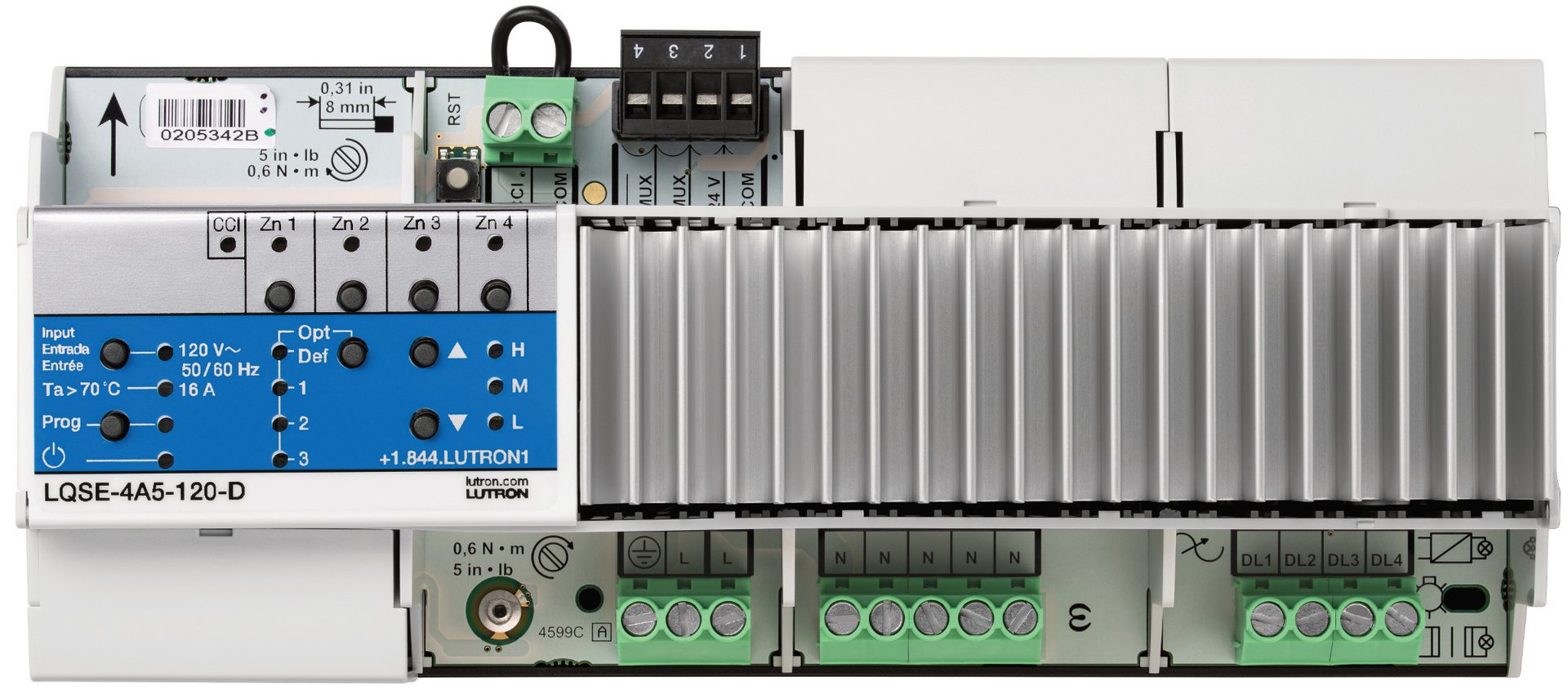
LQSE-4A5-120-D
HomeWorks QS module with integral heatsink, blue label. Higher current per zone.

Panel enclosure
Modules mounted on DIN rails, breakers below, zone wiring out to the house.
This is a hardware exercise rather than a software conversion, and Lutron documents it in Application Note 840. The Panel Link Translator carries an existing Illumination, Interactive, or QS panel link onto QSX, which is what makes the upgrade feasible without tearing out panels. Several things change and have to be planned rather than discovered. QSX consolidates what were nine separate link types down to two, wired QS and wireless RF. Legacy Illumination devices run on 15 volt DC supplies while QSX devices run on 24 volt DC. Illumination used a dedicated RS-485 processor to processor link, where QSX processors communicate over Ethernet, so those runs get replaced with Cat5e. Existing keypad wiring and faceplates can frequently be retained, which is what keeps walls and finishes intact. That single point is usually the difference between a project an owner will authorize and one they will not.
RadioRA 3 is backwards compatible with RadioRA 2 and RA2 Select. The conversion replaces the main repeater and connect bridge with a RadioRA 3 processor, then converts the existing project file in Lutron Designer so the original programming carries forward instead of being rebuilt. Most installed hardware stays on the wall. Maestro dimmers, switches, and fan controls, seeTouch keypads including hybrid and tabletop versions, Pico remotes, Lutron shading, Radio Powr Savr sensors, RF and plug-in modules, and the visor control receiver all carry over. GRAFIK Eye QS wireless control units and GRAFIK T keypads do not, and those get identified and priced before work starts rather than discovered mid project. One failure mode is worth knowing about. Factory resetting the RadioRA 2 main repeater on site will factory default every wireless device in the system, and each one then has to be reactivated individually. On a large estate that turns a planned afternoon into a multi day recovery. We hold the original project file, verify it is current, and convert in the correct order.
Every legacy assessment starts by locating and verifying the original project file. That file holds every load, every zone, every keypad assignment, and every scene as programmed. A system with its file intact is a straightforward engagement. A system without one is a considerably larger project, because the programming has to be reconstructed from the house itself, room by room, before anything can be changed. We will tell you which situation you are in before we quote, rather than after. If your system was installed by a company that has since closed, it is worth asking whoever holds the records for that file now. It is frequently recoverable, and it is worth real money to you.
These systems are in occupied houses, which shapes how the work is sequenced. A migration can be phased so the house is never without lighting control, panel by panel or floor by floor, with the legacy system continuing to run what has not been converted yet. We plan that sequence against the actual panel schedule rather than assuming a single cutover weekend. Regent5 services and upgrades Lutron systems in Atherton, Woodside, Portola Valley, Hillsborough, Los Altos Hills, Los Altos, Menlo Park, and Palo Alto, in San Francisco including Pacific Heights, Sea Cliff, Presidio Heights, Noe Valley, and Russian Hill, and in Saratoga, Los Gatos, Campbell, Ross, Tiburon, Belvedere, Napa, Sonoma, Carmel, and Pebble Beach. Our office and design center is at 1300 Industrial Rd, Suite 12, San Carlos, CA 94070.


Usually it is a statement about the contractor rather than the equipment. The design software for HomeWorks Illumination is distributed by Lutron only to dealers holding HomeWorks certification. A firm without that certification cannot obtain the tool, so it genuinely cannot work on your system, and a full replacement is the only thing it can sell you. Regent5 holds that certification.
It can be upgraded to HomeWorks QSX. Lutron documents the path in Application Note 840, and the Panel Link Translator carries an existing Illumination panel link onto QSX so panels do not have to be torn out. Existing keypad wiring and faceplates can frequently be retained, which is what keeps walls and finishes intact.
Several things do change and get planned in advance: QSX consolidates nine link types down to two, legacy Illumination devices run on 15 volt DC where QSX runs on 24 volt DC, and the RS-485 processor to processor link is replaced with Ethernet over Cat5e.
Interactive is the oldest HomeWorks generation still in regular service. Illumination was designed as a one to one upgrade from Interactive and shares most devices without replacement, so an Interactive system has a defined path forward rather than a dead end. We assess what is actually in the house before proposing anything.
Yes. RadioRA 3 is backwards compatible with RadioRA 2 and RA2 Select. The conversion replaces the main repeater and connect bridge with a RadioRA 3 processor, then converts the existing project file in Lutron Designer so programming carries forward instead of being rebuilt.
Maestro dimmers, switches, and fan controls, seeTouch keypads including hybrid and tabletop versions, Pico remotes, Lutron shading, Radio Powr Savr sensors, RF and plug-in modules, and the visor control receiver all carry over. GRAFIK Eye QS wireless control units and GRAFIK T keypads do not. We identify and price those before work starts rather than discovering them mid project.
It matters a great deal. The project file holds every load, zone, keypad assignment, and scene as programmed. A system with its file intact is a straightforward engagement. Without one, the programming has to be reconstructed from the house itself, room by room, which is a considerably larger project. If the installing company has closed, it is worth asking whoever holds their records, because the file is frequently recoverable and worth real money to you.
It does not need to be. These systems are in occupied houses, so a migration can be phased panel by panel or floor by floor, with the legacy system continuing to run whatever has not been converted yet. We plan the sequence against the actual panel schedule rather than assuming a single cutover weekend.
Yes, including situations where the original dealer has retired, closed, or stopped returning calls. The first step is locating and verifying the original project file, and we will tell you honestly what condition the system is in before quoting.
If the processors, panels, keypads and project file are stable and replacement parts or service options remain practical, targeted repair may be the better first step. An upgrade becomes more compelling when failures are recurring, parts are difficult to source, integrations are obsolete, or the homeowner wants capabilities the legacy platform cannot support.
They should be inventoried before the processor or control architecture changes. Existing shades, automation integrations, voice control, HVAC interfaces and AV connections may require updated drivers, interfaces or programming. Regent5 maps those dependencies before the migration so working systems are not accidentally stranded.
Often, yes, but it depends on the generation and specific hardware. A proper modernization plan identifies what can remain in service, what needs an interface or translator, and what must be replaced. Preserving compatible infrastructure can reduce disruption to finished walls and custom millwork.
Regent5 starts with the processors, repeaters, panel labels, keypad families and available project files, then maps the installed equipment before making upgrade recommendations. That inventory matters because HomeWorks Interactive, Illumination, QS and RadioRA generations have different software, wiring and migration paths.
Regent5 takes on Lutron systems installed by other companies. Send us your contact information and whatever you know about the system, including the processor model if you can find it, and we will tell you honestly what the options are.


.svg)

© 2026 Regent5, LLC. CSLB C10 & C7 License 1033103.

